 Mark Smarter
Free · Word, LibreOffice and Supernote
Math Shapes
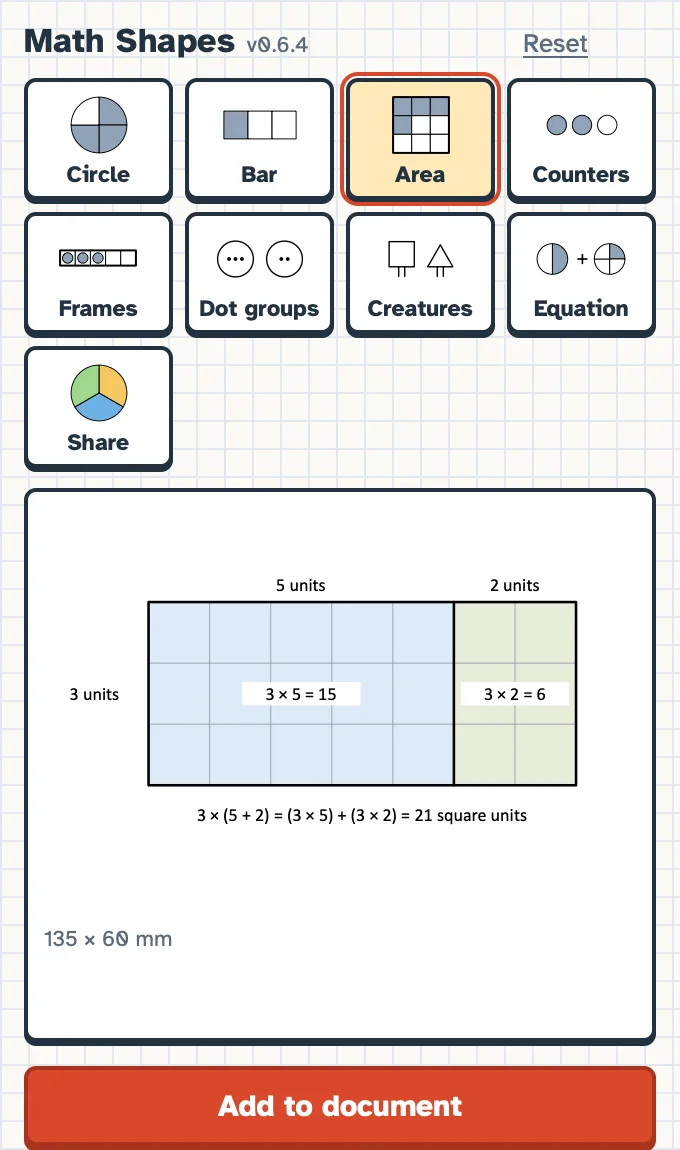
Draw fraction circles, bars and walls, area models, split rectangles for multiplication, counters, five and ten frames, dot groups and fair-share pictures right inside your document. Everything goes in as real, editable shapes, grouped together, so you can move, resize or recolour them like anything else you draw. You choose the numbers; the tool draws exactly what you set.
Download
Version 0.6.4 for Word and LibreOffice. Free, no account needed.
Microsoft Word
Word for Mac (Microsoft 365 or Office 2021 and later)
Adds a Math Shapes button to the Insert tab that opens a side panel.
Download for WordLibreOffice Writer
LibreOffice Writer on a Mac
Adds Math Shapes to the Insert menu and the toolbar. Updates through the Extension Manager.
Download for LibreOfficeSupernote
Supernote tablets with plugins (version 0.8.2)
The same tools drawn in pen strokes on your note page, ready to write on. On the Supernote it is still called Fraction Tools.
Download for SupernoteInstalling
About two minutes. You only do this once: after that, Math Shapes updates by itself.
- 1Download the Word file with the button above. It goes to your Downloads folder and is called math-shapes-word.xml.
- 2Quit Word if it is open: Word › Quit Word, or press ⌘ Q. Save anything you are working on first.
- 3Click on the desktop so Finder is in front, then choose Go › Go to Folder… (or press ⇧ ⌘ G).
- 4Paste this, then press Return:
~/Library/Containers/com.microsoft.Word/Data/Documents - 5You are now in Word’s own Documents folder. If there is no folder called wef, make one: File › New Folder, type wef and press Return. Then double-click wef to open it.
- 6Drag math-shapes-word.xml from Downloads into the wef window.
- 7Open Word and any document. On the Insert tab, press Math Shapes. If you don’t see it, choose Insert › Add-ins › My Add-ins and pick Math Shapes under Developer Add-ins.
- 8The Math Shapes panel opens beside your page. Pick a picture, set your numbers, and press Add to document. Everything goes in as shapes you can move, resize and recolour.
About a minute. Works in LibreOffice Writer.
- 1Download the LibreOffice file with the button above. It goes to your Downloads folder and is called MathShapes.oxt.
- 2Open LibreOffice and choose Tools › Extensions… to open the Extension Manager.
- 3Press Add…, choose MathShapes.oxt in Downloads, and press Open. If LibreOffice asks you to accept, press Accept.
- 4Quit LibreOffice completely (LibreOffice › Quit LibreOffice, or ⌘ Q) and open it again.
- 5In a Writer document, choose Insert › Math Shapes…, or press the fraction circle button on the toolbar. Pick a picture, set your numbers and press Add to document.
Getting updates: open Tools › Extensions… and press Check for Updates…. LibreOffice downloads the newest Math Shapes for you. If you have the older Fraction Tools version, it updates to Math Shapes the same way.
About two minutes. You need a computer for the first step.
- 1Download the Supernote file with the button above. It is called FractionTools.snplg.
- 2Put the file in your Supernote’s MyStyle folder. With the Supernote Partner app, drag it into MyStyle and let it sync. Or plug the Supernote into your computer with its cable and copy it into MyStyle.
- 3On the Supernote, open Settings › Apps › Plugins, choose Fraction Tools and install it.
- 4Open a note and press Fraction Tools on the toolbar. The first time, choose Always allow when it asks for access to your notes. Pick a picture, set your numbers and press Insert.
Getting updates: download the newest file from this page and repeat steps 2 and 3.
Get support
Something not drawing the way you expected, or an idea for a new picture? Send us a note and we’ll write back by email.
What’s new
- Word and LibreOffice 0.6.4
- Now called Math Shapes. New in the Area tool: split rectangles for multiplication, with the lengths along the sides, the product in each part and the equation underneath. In Word, centred labels stay centred. In LibreOffice, labels no longer sit a line too high when a picture is added in the middle of a line, and the Insert menu works even if your browser renamed the downloaded file.
- Supernote 0.8.2
- Renamed from Math Shapes to Fraction Tools. New: area models, dot groups, creatures and fair-share pictures, and pizza shading for circles. The same drawing engine as the Word and LibreOffice versions.
- Word and LibreOffice 0.5.0
- First release of Fraction Tools: fraction circles, bars and walls, area models, counters, five and ten frames, dot groups, creatures with legs, fraction equations and fair-share pictures. Pizza fill for circles. Sizes in millimetres, centimetres, inches or pixels.
Your download has started
Math Shapes is free. If it saves you time, you can buy us a coffee to help keep it going.